
Yubo: Make friends & chat now
Twelve APPSocial
3.932.09K Reviews
- Version
- 4.322.0
- Installs
- 10.00M
- Age Rating
- Mature 17+
Screenshots


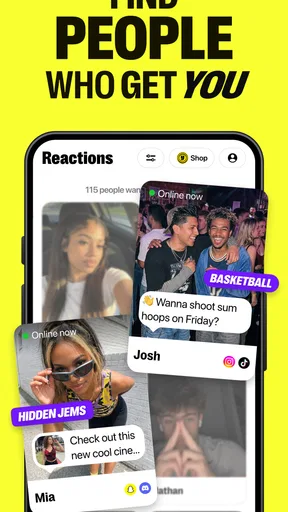

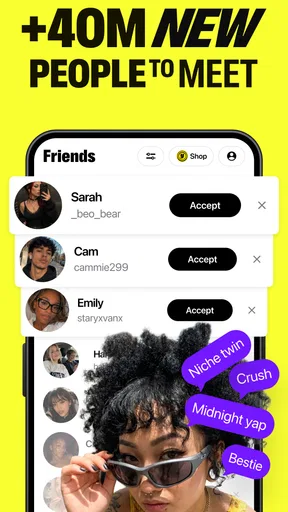

Our Review of Yubo: Make friends & chat now
 Analysis by Appyee
I approached Yubo as a social app for meeting people beyond my existing contacts, not as a replacement for a private messaging service. Its central idea is simple: open the app, discover other users, and start conversations that may develop into friendships. That makes it appealing when I want a wider social circle, but it also means the experience depends heavily on how comfortable I am with public interaction, quick decisions, and conversations with people I do not already know.
Developed by Twelve APP, Yubo is free to download and sits in the mature social category. It has reached over 10 million installs, with an average rating of 3.9 from around 414 thousand ratings and roughly 32 thousand written reviews. Those figures suggest a large, active audience, although they also tell me to expect a mixed experience rather than a universally smooth one. The app is currently at version 4.301.0 and requires Android 10 or later, while optional purchases range from $4.99 to $94.99 per item.
How readable navigation affects the first few minutes
The first thing I noticed is that Yubo asks me to think socially almost immediately. This is not an app where I can spend a long time quietly arranging folders or reading a tutorial before deciding what to do. The value comes from browsing people, choosing whether I want to engage, and moving into chat. That directness is useful for confident users, but it can feel fast for anyone who needs more time to understand a new interface.
For me, the most important navigation question is not whether every screen is visually attractive; it is whether I can tell what will happen before I tap. In a social app, a small icon can represent a profile decision, a conversation, or a live interaction. I recommend taking a slow first pass through the main areas instead of tapping rapidly. That simple habit reduces accidental actions and gives me a clearer sense of where discovery ends and messaging begins.
The app’s social purpose is easy to understand because it stays focused on people and conversations. I do not have to learn a complicated editing workflow or manage a large content library. However, the same focus can make the screen feel busy when several people, prompts, and interaction choices compete for attention. Users with reading difficulties may benefit from increasing the phone’s system text size before settling into regular use, then checking whether important labels remain comfortable to read.
I also found that profile reading deserves more attention than a quick glance. A short profile can leave a lot open to interpretation, while a longer one may require sustained reading before I decide whether a conversation feels worthwhile. I prefer checking the complete context first and only then starting a chat. This is more accessible for me than making several rapid choices and trying to reconstruct the details afterward.
One practical strength is that Yubo can support people who find face-to-face introductions difficult. I can pause before replying, reread a message, and decide how much personal information to share. That control is different from a noisy group setting, where conversation moves on before I have found the right words. At the same time, the app is still socially demanding: delayed replies, unfamiliar people, and unclear intentions can create pressure even when the interface itself is understandable.
Making discovery less tiring
I would use a short, deliberate session rather than browsing indefinitely. After a few conversations, I would close the app and note which interactions felt comfortable, confusing, or demanding. This is especially helpful for users who experience social fatigue, attention difficulties, or sensory overload. The goal is not to maximize the number of contacts; it is to make the few interactions I keep more manageable.
Another useful workflow is to prepare a small introduction in advance. A sentence about the kinds of conversations I enjoy gives me something reliable to send when starting a chat, and it removes the need to invent an opening every time. It also makes the app less dependent on fast typing or spontaneous social performance.
Motor and sensory considerations during real conversations
Yubo’s usefulness for different abilities depends partly on the phone itself. I can use system-level tools such as larger text, display magnification, voice input, and screen-reading support where the device provides them, but the experience may vary between screens. I would not assume that every visual element will be equally clear with those settings enabled. A careful test of browsing, profile reading, and chat entry is more useful than changing every setting at once.
For users with limited fine-motor control, the main challenge is the repeated need to select small on-screen targets accurately. Social apps often reward quick gestures, but I would not treat speed as a requirement. Holding the phone steadily, using one interaction at a time, and relying on voice typing for longer replies can reduce strain. A physical keyboard paired with the phone may also help someone who finds touchscreen typing tiring, although that is a personal setup rather than a special Yubo feature.
Voice input is particularly practical here because conversation is the core activity. I can dictate a thoughtful reply instead of repeatedly tapping a small keyboard, then review the text before sending it. That last review matters: dictated messages can misinterpret names, slang, or punctuation, and a mistake in a new conversation can create unnecessary confusion.
Sensory comfort is more complicated. A social discovery screen can be stimulating because it combines faces, text, choices, and the expectation of an immediate response. Someone sensitive to visual motion, bright displays, or dense screens may prefer using the app with reduced phone brightness, a calmer environment, and notifications limited to times when conversation is welcome. I would also avoid using it when tired, because judging tone and boundaries becomes harder when my attention is already low.
Hearing differences change the usefulness of any interaction that depends on audio or live participation. Text chat is the safer starting point for me because it lets me communicate without relying on sound. If I choose an audio-based interaction, I would first confirm that I can follow it comfortably and that I can leave without feeling trapped. The app may be socially flexible, but the accessibility of a particular conversation still depends on the other person’s communication style.
Users with speech differences can also use written conversation to avoid being judged on speed or pronunciation. That does not remove every barrier, since typing can be slow or physically demanding, but it gives more control than a spontaneous spoken exchange. I appreciate that this makes the app potentially useful for people who want social contact while choosing the communication method that suits them best.
Why pacing matters more than clever shortcuts
My strongest practical tip is to separate discovery from conversation. I would first identify a small number of profiles that seem relevant, then chat with one person at a time. This reduces the motor and attention burden of switching constantly between people. It also improves the quality of replies because I am less likely to confuse details from different conversations.
I would keep the phone’s accessibility settings stable while learning the app. Changing text size, contrast, and touch options repeatedly can make it difficult to tell whether a problem comes from Yubo or from the device configuration. Once a comfortable setup is found, using it consistently makes the experience more predictable.
Using Yubo in different situations
The app makes the most sense for someone who wants to meet new people rather than simply maintain existing friendships. A student arriving in a new area, an adult rebuilding a social circle, or someone who prefers online introductions before meeting people in person may find a genuine use for it. I would describe it as a tool for opening doors, not as a guarantee that every conversation will become meaningful.
A realistic everyday example would be a person who has moved to a new city and has limited energy after work. Instead of attending a crowded event, they could spend a short evening session reading profiles and starting one conversation based on a shared interest. The next day, they can continue the chat when they have more energy. That asynchronous rhythm is valuable for people who need recovery time between social interactions.
It can also help someone who feels more comfortable expressing personality through writing. I can think about my response, correct it, and choose when to continue. This may be better than a traditional local social event for a user who has anxiety, fluctuating energy, or difficulty processing several conversations at once. The trade-off is that text removes some context: I cannot always tell whether a person is joking, impatient, or simply brief.
For users who need a highly predictable social environment, Yubo may be a poor match. The people I encounter are not all communicating in the same way, and the pace can change from one interaction to another. Someone looking for a tightly moderated interest forum, a professional network, or a private messaging app for known contacts would probably be better served by a more specialized alternative.
Compared with ordinary messaging apps, Yubo is stronger at helping me discover unfamiliar people but weaker at providing an established trust network. A messaging service built around contacts I already know usually offers clearer expectations and less uncertainty. Compared with interest-based communities, Yubo feels more immediate and personal, but it may offer less structure around a shared topic. Compared with dating-focused platforms, its social purpose is broader, so I would not use it when I want a narrowly defined romantic matching experience.
The mature rating is important in deciding who should use it. I would not treat the app as appropriate for children or younger teenagers, even if they are comfortable with social media. Adults should also remember that a large audience does not make every interaction safe or respectful. I would avoid sharing an address, workplace details, financial information, or anything that could make me easy to identify outside the app.
Remaining barriers that affect inclusion
The biggest barrier is not necessarily a button or menu; it is the uncertainty built into meeting strangers. Users with cognitive disabilities, anxiety, or difficulty interpreting implied meaning may find it hard to judge whether someone is being sincere. A profile can provide clues, but it cannot replace clear communication. I would encourage anyone who uses Yubo to establish personal rules before chatting, including what information stays private and when a conversation ends.
Another barrier is the pressure to answer quickly. Even if the interface is readable, the social expectation can be exhausting. I do not think a good experience requires constant availability, so I would silence notifications during work, sleep, appointments, or recovery time. The app becomes more manageable when it fits around my routine instead of controlling it.
There is also a financial consideration. The app is free to use, but optional purchases can cost from $4.99 to $94.99 per item. I would begin without buying anything and decide whether the basic experience already meets my needs. If I later consider a purchase, I would check the amount carefully and use the platform’s purchase controls. This is especially important for users who benefit from strict budgeting or who share a device with family members.
Device compatibility is another practical point. Android users need version 10 or later, so anyone with an older phone or operating system should check compatibility before planning around the app. This is not an accessibility judgment, but it can become an access barrier for people who cannot upgrade their device easily.
I would also be cautious about treating popularity as proof of personal suitability. Yubo has a substantial audience and a 3.9 average rating, but a broad user base cannot tell me whether the interface will work well with my vision, motor control, hearing, attention, or communication preferences. The right test is a short session using my normal accessibility settings, followed by an honest check of how tired or comfortable I feel.
For people with visual impairments, I would pay close attention to whether profile information, controls, and chat actions are announced clearly by their screen reader. If a key action is represented mainly by an unlabeled icon or an image, that can interrupt an otherwise promising interaction. I would not build an important social routine around the app until those essential steps feel dependable on my particular phone.
My inclusive verdict after using it as a social tool
I see Yubo as a potentially useful way to widen a social circle, especially for people who prefer written introductions, need time to respond, or find traditional social settings overwhelming. Its focused purpose makes it easier to understand than a large all-in-one social network, and the ability to start conversations with unfamiliar people is genuinely different from ordinary contact-based messaging.
Still, I would recommend it with boundaries rather than enthusiasm without conditions. The mature audience, uncertain social context, optional spending, and possible sensory or motor demands all deserve attention. It is not the best choice for someone seeking a quiet, highly structured community, a private space limited to known friends, or an environment where every interaction follows the same communication rules.
My preferred approach is gradual: set up comfortable phone accessibility options, read profiles carefully, start with text, keep sessions short, and share personal details slowly. I would use voice typing or a keyboard if touchscreen entry causes strain, and I would pause when the volume of interaction becomes tiring. These small choices make a considerable difference because they put the pace back in my hands.
In the end, the app works best when I treat it as an invitation to explore, not an obligation to respond to everyone. If I want new conversations and can manage the uncertainty of meeting strangers online, it may be worth trying. If I need predictable moderation, a narrow shared interest, or communication designed around a specific accessibility need, another social service may be the better option. My recommendation is cautious but positive for adults who value flexible, text-friendly social discovery and are willing to set firm limits.
Privacy and Permissions
See what permissions an app requests and how it handles your data.
- Location
- approximate location (network-based), precise location (GPS and network-based)
- Phone
- read phone status and identity
- Photos/Media/Files
- read the contents of your USB storage
- Storage
- read the contents of your USB storage
- Camera
- take pictures and videos
- Microphone
- record audio
- Wi-Fi connection information
- view Wi-Fi connections
- Device ID & call information
- read phone status and identity
- Other
- view network connections, pair with Bluetooth devices, full network access, change your audio settings, run at startup, prevent device from sleeping
Verdict
Strengths of Yubo: Make friends & chat now
- Easy-to-use interface for discovering and chatting with new people
- Live streaming adds a more interactive way to meet users
- Filters help narrow matches by age, location, and interests
- Supports one-to-one chats as well as group conversations
- Safety tools let users report, block, and manage unwanted contact
Limitations of Yubo: Make friends & chat now
- Many features depend on a stable internet connection
- Some advanced filters and perks may require paid subscriptions
- Public interactions can expose users to inappropriate behavior
- Location-based discovery may raise privacy concerns for some users
- The app can feel overwhelming because of frequent notifications
Similar Picks in This Category
View All
Meta Platforms, Inc.4.6

Instagram4.0

Likee-Live, Chat & Party Games
Likeme Pte. Ltd.4.4

Facebook Lite
Meta Platforms, Inc.4.5

TikTok - Videos, Shop & LIVE
TikTok Pte. Ltd.4.0

Moj: Free Short Drama & Reels
ShareChat4.1
Frequently Asked Questions
What is Yubo: Make friends & chat now?
Yubo is a social networking app designed to help people meet new friends through live video streams, chats, and interest-based interactions. After creating a profile, users can browse other members, join live conversations, swipe through potential connections, and exchange messages. The app focuses more on social discovery and casual conversation than on traditional dating, although users should still communicate responsibly and carefully.
Is Yubo safe for teenagers and young users?
Yubo includes age-related protections, reporting tools, blocking options, moderation features, and privacy controls intended to make interactions safer. However, no social platform can eliminate every risk, especially when users communicate with strangers or appear on live video. Before downloading, users should review the current age requirements, avoid sharing personal information, report suspicious behavior, and involve a parent or trusted adult when appropriate.
Is Yubo free to download and use?
Yubo can generally be downloaded and used without an upfront purchase, allowing users to create a profile, discover people, join live streams, and chat. Some optional features may require in-app purchases or a paid subscription, depending on the account and the app version. It is worth checking the store listing and purchase settings before using premium boosts or other paid extras.
How do you meet and chat with people on Yubo?
After setting up a profile, you can explore users with similar interests, swipe through profiles, join live video streams, and participate in group conversations. Depending on privacy settings and mutual interaction, you may also be able to send messages or continue a conversation privately. A clear profile and respectful introduction can help, but users should avoid feeling pressured to respond or share more than they want.
What privacy controls and reporting tools does Yubo offer?
Yubo provides tools that can help users manage their experience, including blocking accounts, reporting inappropriate content or behavior, and adjusting certain profile and interaction settings. Because features and menus can change with updates, users should inspect the privacy and safety sections after installation. Avoid displaying addresses, school details, phone numbers, passwords, or other sensitive information during chats or live broadcasts.
